Sunday, August 16, 2015

Creating innovative solutions NOW

This week the AT Series focus was technologies and strategies that enable students to create and demonstrate their skills and knowledge. The top three Twitter crowdsourced solutions are Brain Power + Google Glass, the Book Creator App and Cloud-based Technology.

Brain Power have developed Google Glass apps called the Empowered Brain Suite for Autism. The Google Glass Apps encourages students to interact with their parents and make eye contact by presenting exercises like a game.

Other areas the Empowered Brain suite will develop include language. When a child looks at something through Google Glass, the object is identified through the device's machine vision, and its name is displayed and spoken through the Glass's speaker or earbud.

In the classroom the Book Creator App is a favourite for students producing and creating. The App offers users endless creativity options. The example on Twitter this week was creating a story book with students recording the pages using sign language. 
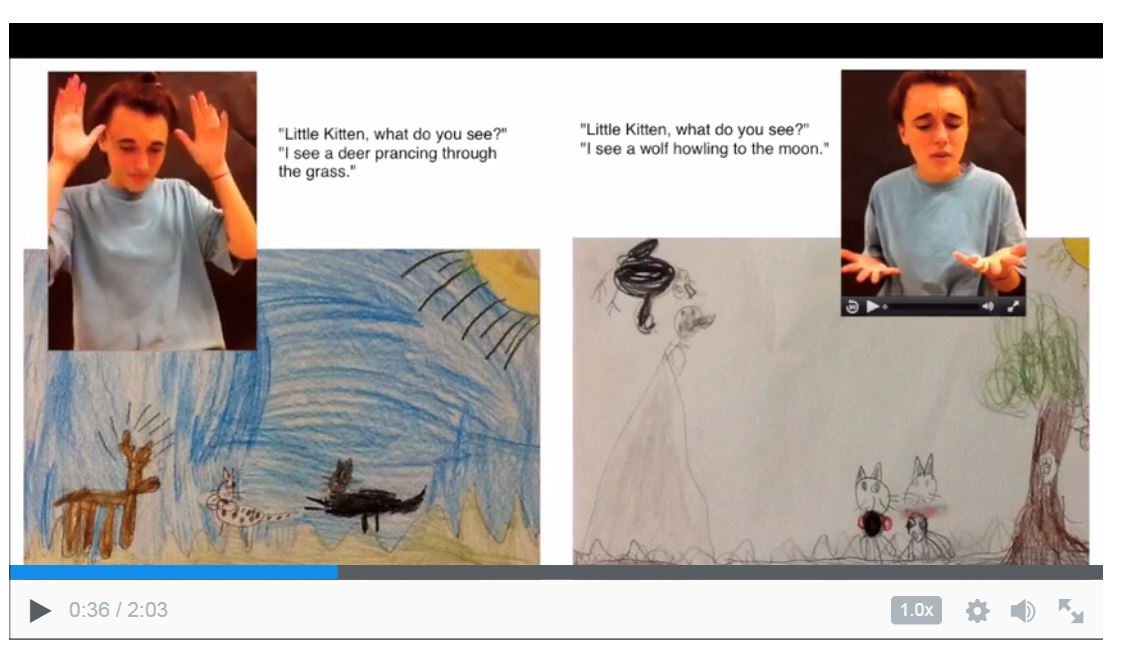
To watch the video visit the link

The third innovative solution is cloud-based computing. Synchronizing multiple devices and services to automatically adjust to the assistive preferences pre-set by a user. This offers users a whole new world of independence, collaboration and participation (access anywhere, anytime). One example of this is:

TCN, a leading provider of cloud-based call centre technology, has recently developed Platform 3 VocalVision, a call centre technology platform designed specifically for visually impaired call centre agents. TCN optimized its software with JAWS (Job Access With Speech), a popular screen reader, to help call centre agents perform their day-to-day tasks smoothly and productively.

The AT Series Week 5 focuses on designing challenging curriculum for all students. Hope you join us on our AT journey on Twitter #SYDTnL

References

Monday, August 10, 2015

AT Week 3: Empower, Prepare, Engage


The main focus of the AT (Assistive Technology) Series this week was identifying resources which engage students in learning materials. Engaging students multiple times and through a variety of lenses - text, video, pictures. We received some great examples through Twitter - QR Codes, Student Blogs, Kahoot.it, all tools that can be differentiated and inclusive for students.

To engage students we need to empower them and spike their curiosity. Offering choices and giving students a certain degree of control over their learning. Students need to achieve success and build upon on each little success to become empowered learners.

Engagement needs hooks - wonder questions, interesting pictures, tapping into students’ life experiences and motivating them to want to investigate further. Learning needs to be authentic, interesting and connect students to each other, engaging them deeply in key learning areas.

We can’t engage or empower unless we plan. As teachers we need to identify the barriers to learning in the curriculum and create learning strategies that move around, through, or take different paths to achieve learning outcomes for all students.

Thank you to everyone who contributed to the AT Series Week 3.

Looking forward to Week 4 - Creating

What opportunities, tools and resources do we make accessible for students to create / produce and demonstrate their learning?
At Series Week 4

References
Jarod Bormann and his Flipped Classroom website for the image http://linkis.com/jardo3.wix.com/1QruC
Edutopia Creating the Conditions for Student Motivation

Sunday, August 2, 2015

“Learning should fit the person - not the person fit the Curriculum”


Make it Real.JPG
What door do you open to make learning real and inclusive? 

As we come to the end of the second AT (Assistive Technology) Series week I reflect on why the Innovation and Development Team should pursue and champion Assistive Technology for all students? My faith has been restored.

Over two years ago (May 2013) both parties of the Federal Government agreed to establish the National Disability Insurance Scheme (NDIS). As the scheme starts to roll-out one of the first groups to benefit are young people under the age of 18.

When reading the goals for the NDIS Towards solutions for Assistive Technology - Discussion Paper Dec 2014; It struck me the alignment between the goals for participants (students) and the AT Series are complimentary.
  • Maximise participation choice and control 
  • Support Innovation
  • Ensure Sustainability
Hopefully you feel inspired as a teacher and a learner to explore and investigate the assistive technology possibilities for students and will join us in the AT Series as we begin Week 3, either on Twitter #SYDTnL, Google+ or the CEO Cloudshare Google Guides.

Week 3 AT Series
Week 1 AT Series
Week 2 AT Series


References
NDIS Assistive Technology Discussion Paper
“The Scheme should fit the person - not the person fit the Scheme”
Bev Freeling, Carer Representative, Assistive Technology Sector Reference Group

A Moment in History

Friday, July 10, 2015

AT Series

Join us in a crowdsourcing Assistive Technology (AT) Series with a difference!
Need to know more, click here or click the flyer in the right hand column!


Flipping the classroom with Assistive Technology


What are some assistive technology tools that can make a difference when flipping the classroom in the experience phase?Flipping the classroom was first developed to eliminate students learning misconceptions when completing tasks at home. Research shows that once a misconception is learnt it is twice as hard to correct the misconception. Flipping the learning sequence opens the classroom to student choice, collaboration, critical and creative thinking.
Using some of the assistive technology tools below can help all students when accessing flipped resources.

 Assistive Technology  Enabling Learning
Close Captions

Students can turn on close captioning when watching Youtube, videos and TV. Close Captions allow students to see and hear the text assisting students to become better readers and recognise words spelt correctly. Teachers can model this practice in class by turning on close captions when viewing a video clip in the classroom.

Text to Speech

Most devices have text to speech available as a feature. Students can hear the word or sentence used in context and recognise correct spelling. Teachers can encourage students to listen to a task before handing it for feedback. Often our ears pick up what our eyes miss. Many authors use this tool before they hand work to their editors.


Audio Books

Giving students choice by providing access to novels as audio books. Local and school libraries are a great supply of audio books. Encouraging students to use commute time to listen to their novels is a strategy to promote better readers. Podcast are making a return in popularity.

The Serial (16+) and Storynory ( 8+) are two sites.


Speech to Text

Speech to Text is another tool giving students choice in how to document their learning. The ability of being able to generate your thoughts and speak them in as text lessens the cognitive load. Once the text is in students can then manipulate the order and connect ideas together.


As we start on the AT Series journey we look forward to the sharing of resources and strategies in building our collective knowledge opening opportunities of student choice and the chance to experience a wide variety of learning opportunities.

Sunday, July 5, 2015

Arrowsmith Program

I'd like to encourage people to explore the area of neuroplasticity and how developing parts of the brain can really open up neural pathways for students with learning challenges. Amazing possibilities for students with dyslexia. Have a look at Barbara Arrowsmtih's Website

Friday, May 20, 2011

Alan November

Learnt heaps this afternoon by Alan November. Not only about new collaborative tools, especially for primary school students but also about how important it is to ensure that your audience understands and practices what you are explaining.http://educationalchangemanagement.blogspot.com/2011/04/purposeful-work-alan-november-ted-talk.html

This link goes to a tedtalk by Alan and captures the essence of today's talk. He is such a clam presenter and involved the young students of OLMC Mt Pritchard. Food for thought re the next PD I run and involving students in the session!! A challenge but really purposeful.
I learnt about easywhoisit to find out if articles on the net are bias and factual. The importance of teaching digital literacy and actually knowing what and why things are on the screen. Much learning to do here.

all thing PLC

http://www.allthingsplc.info/wordpress/?p=1006

click on this link to read interesting Q and A regarding assessment and PLC's. All over the world teachers are grappling with how to provide the best feedback to students and to assess fairly and in a meaningful manner.